
MetaTrade G4 Bot – How to Trade Short-Term with AI Precision
The MetaTrade G4 Bot is the foundation of Metaset’s short-term trading bots — a powerful yet straightforward AI trader built for speed, precision, and instant execution.
Designed for users who want to capitalize on short market movements, the G4 bot operates with an aggressive trading strategy, issuing rapid signals and executing trades automatically upon activation.
It’s ideal for traders who prefer quick cycles, visible results, and a balance between automation and control.
Like all Metaset bots, once activated, the G4 bot immediately starts trading and cannot be paused or edited during its cycle.
Key Features
- Single Signal Mode – Gold:
The G4 bot focuses exclusively on Gold signals, optimized for fast and high-reward trading opportunities. - AI Scalping Engine:
Uses advanced short-term algorithms that analyze live ETH and BTC price movements for micro-volatility patterns. - Loss Coverage Enabled:
Provides partial protection by absorbing a portion of potential losses in case of a stop-loss event. - Immediate Activation:
Trades start instantly after clicking “Activate New Bot”, allowing users to capture short-term price swings. - Transparent Results:
Full visibility into every transaction, performance metric, and bot history from your dashboard. - Beginner-Friendly Interface:
Simplified design that lets users focus on results rather than setup complexity.
Exploring the G4 Bot Interface
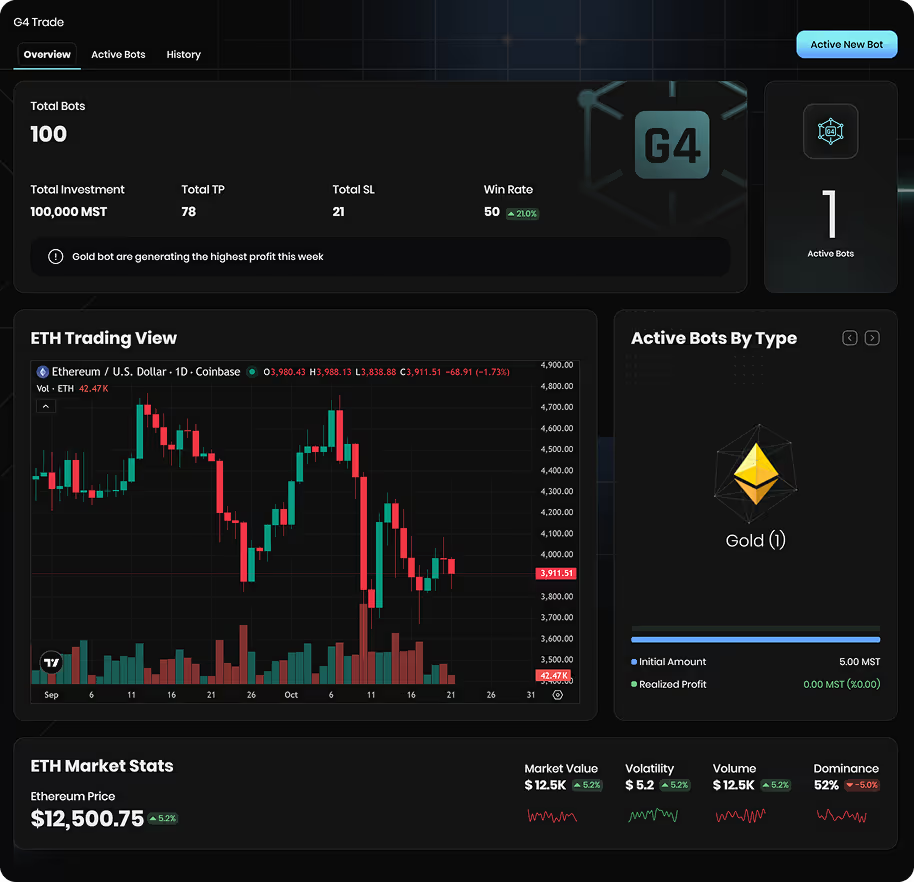
The G4 bot’s panel is divided into three main sections, each offering tools to analyze performance, activate trades, and review results.
1. Overview Tab – The Trading Dashboard
The Overview tab gives you a complete real-time snapshot of your trading environment.
🔹 Performance Summary
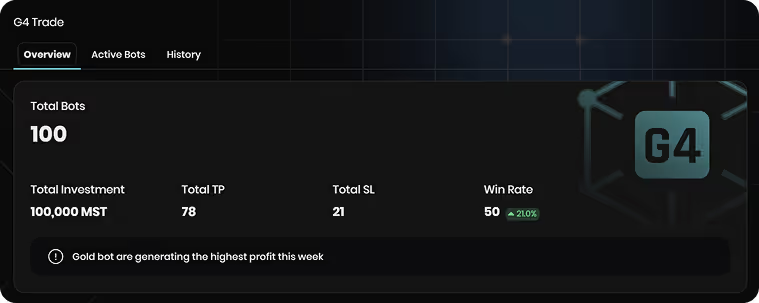
At the top, you’ll find metrics such as:
- Total Bots (active and completed)
- Total Investment (MST)
- Total Take Profit (TP) and Stop Loss (SL)
- Win Rate percentage
💡 Use this section to track the overall effectiveness of your G4 strategy over time.
🔹 ETH Trading View
Displays a live ETH/USD chart powered by TradingView, allowing you to observe real-time price action and market trends before activating a bot.
This helps traders identify optimal entry moments or avoid trading during flat or unstable periods.
🔹 Market Statistics
Below the chart, you’ll find real-time data:
- Market Value
- Volatility
- Volume
- Dominance
These stats offer a quick market pulse — essential for timing your activations more effectively.
🔹 Active Bots by Type
Shows your currently running Gold bots, their initial investment, and realized profit.
Since G4 exclusively uses Gold signals, this section is a fast way to view live performance and profitability.
🔹 Activate New Bot
This button, located at the top right, is your entry point for launching a new bot.
Click “Activate New Bot”, enter your desired investment (minimum 5 MST), and confirm.
The bot begins trading immediately using the latest Gold signal.
2. Active Bots Tab – Monitor Ongoing Trades
This section lists all currently active G4 bots, helping you track open positions and assess your exposure.
Each bot card includes:
- Bot Type (Gold)
- Realized Profit (in MST)
- Initial Amount
- Activation Date and Time
- Risk Indicator (Loss Coverage)
💡 Tip: Check this tab regularly to monitor ongoing bot performance and identify which sessions deliver the best results.
3. History Tab – Review Past Performance
The History tab is where you can analyze completed trades and overall profitability.
Displayed fields include:
- Transaction ID
- Start Balance (MST)
- Bot Type (Gold)
- Loss Coverage Status (“Made Risk”)
- Final Balance After Market Cycle
- Timestamp of Creation and Completion
This section is perfect for performance review — helping you spot profitable cycles, understand risk behavior, and refine future activation timing.
How the G4 Bot Works
The G4 bot operates as a high-frequency AI scalper, focusing on short-term crypto price patterns.
Here’s how it functions:
- The AI scans ETH and BTC markets for volatility and momentum shifts.
- When a profitable signal is detected, the system generates a Gold signal.
- Once you activate the bot, it executes a position instantly and monitors it for that signal’s duration.
- The bot closes automatically when the target or stop-loss is hit, displaying the result (TP/SL) in your dashboard.
Every G4 trade is independent — meaning each activation runs as its own isolated AI cycle.
💡 Strategy Tips
- You don’t need to activate the bot on every signal — observe first.
- Check the TradingView chart before activation to understand current market direction.
- Monitor volatility indicators in the Market Stats section — higher volatility often means higher risk.
- Start with smaller MST amounts before scaling up.
- Review the History Tab frequently to identify performance trends over time.
🔒 Risk and Coverage
G4 includes loss coverage, reducing the impact of losing trades by compensating a portion of the loss.
However, it remains an aggressive short-term bot, meaning profits and losses can vary significantly across cycles.
It’s best suited for traders comfortable with rapid, high-frequency decision-making who want to test the limits of AI scalping technology.
⚠️ Important Reminder for Short-Term Bots
Whether you’re using G4, G5, G6, or the Low-Risk Bot, always remember:
- Trading carries inherent risk. AI can enhance performance but not eliminate uncertainty.
- You are not required to activate on every signal.
Sometimes, simply observing how signals behave under different conditions can lead to more strategic future activations. - Use the charts and past performance data to determine when it’s best to engage the bot.
📊 Smart observation often equals smart profit.
Conclusion
The MetaTrade G4 Bot is where intelligent AI trading begins — a bold, fast-paced, and highly transparent system built for short-term profit cycles.
Its focused Gold strategy, live market analysis, and integrated loss coverage make it a great introduction to AI-driven trading.
For users looking to trade frequently and maximize short-term opportunities, G4 provides the perfect blend of simplicity, automation, and risk management.
Use it wisely, monitor your results, and leverage data — not emotion — for every activation.
Related FAQs
the minimum deposit amounts for each payment method:
🔹 For TRX deposits: The minimum deposit amount is $10 equivalent in TRX.
🔹 For USDT (TRC20) deposits: The minimum deposit amount is $50.
If your deposit is below these minimum limits, the funds will be considered as network fees and will not be added to your balance. This is a TRON network policy and is not controlled by Metaset.
Additionally, for every deposit, Metaset assigns a new wallet address. Ensure you always use the latest wallet address displayed on your deposit page. If you deposit funds to an old address, only the first deposit will be processed, and subsequent deposits to the same address will not be credited.
Don’t miss your chance to trade smarter, not harder
Join Metaset and take your trading decisions to the next level with data-driven confidence