
Profile Page in Metaset – Manage Your Account, Security, and Settings
The Profile page is where you manage your Metaset account. From here, you can check your verification status, update security preferences, customize notifications, and personalize your platform experience.
Let’s take a walkthrough of the Profile page and its key features.
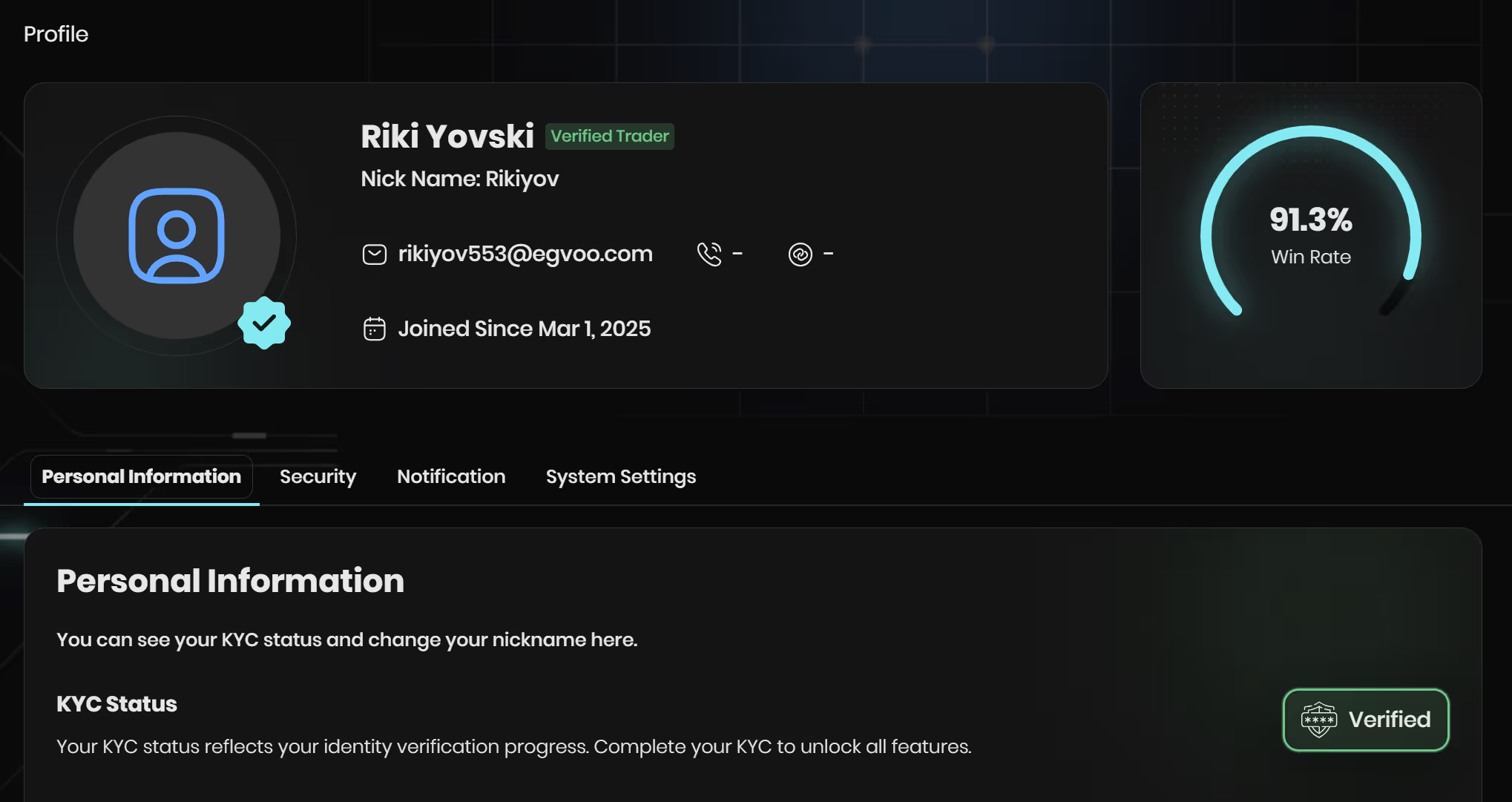
1. KYC Badge & Verification Status
At the top of your Profile, you’ll see your KYC status.
- If your account is fully verified, you’ll see a green Verified badge.
- This badge confirms your identity has been reviewed.
⚠️ Note: Completing KYC is not mandatory for most users. However, some features like P2P Pay require KYC. Be prepared to complete verification when necessary.
2. Blue Tick – Verified Trader
Next to your username, you may see a blue tick badge.
- This indicates that you are a Verified Trader.
- It shows other users that your account is genuine and verified by Metaset.
- To obtain it, you must successfully complete KYC verification.
3. Profile Tabs Overview
The Profile page has several tabs to help you manage different aspects of your account.
a) Personal Information
- View your KYC status.
- Update your nickname, which is how others will recognize you on the platform.
b) Security
- Change Password: To set a new password, you’ll be guided through the forgot-password reset process.
- Profile Visibility: Toggle what others can see, including:
- Nickname visibility
- Phone number visibility
- Social links visibility

This gives you control over how much of your profile is public.
c) Notifications
Manage the alerts you receive from Metaset:
- Email notifications – for account updates and important alerts.
- Marketing & promotions – newsletters, discounts, and offers.
- Security alerts – login attempts or password changes.
- Newsletter subscription – updates about new features, bots, and platform improvements.
You can toggle each option on or off depending on your preferences.
d) System Settings
Customize your dashboard experience:
- Language – choose your preferred language.
- Theme – switch between light and dark mode.
- System sounds – enable or disable platform sounds (like alerts or interactions).
4. Why the Profile Page Matters
The Profile page is more than just account details—it’s your control center for:
- Security – protect your account and manage visibility.
- Verification – track or complete KYC when needed.
- Personalization – adjust language, theme, and sounds.
- Notifications – decide what updates you want to receive.
Final Notes
While KYC is not mandatory on Metaset, you should complete it when required to access features like P2P Pay. Make sure your Profile information is always accurate, review your security settings regularly, and personalize the platform so it works best for you.
👉 Ready to manage your account? Head to the Profile page and explore your settings today.
Related FAQs
the minimum deposit amounts for each payment method:
🔹 For TRX deposits: The minimum deposit amount is $10 equivalent in TRX.
🔹 For USDT (TRC20) deposits: The minimum deposit amount is $50.
If your deposit is below these minimum limits, the funds will be considered as network fees and will not be added to your balance. This is a TRON network policy and is not controlled by Metaset.
Additionally, for every deposit, Metaset assigns a new wallet address. Ensure you always use the latest wallet address displayed on your deposit page. If you deposit funds to an old address, only the first deposit will be processed, and subsequent deposits to the same address will not be credited.
Don’t miss your chance to trade smarter, not harder
Join Metaset and take your trading decisions to the next level with data-driven confidence