
MetaTrade G5 Bot Guide – How to Use, Analyze, and Trade with AI Signals
The MetaTrade G5 Bot is one of Metaset’s most balanced and versatile AI-powered trading bots.
Positioned between the high-speed G6 and the lower-frequency bots, G5 is designed for traders seeking frequent, short-term profits with moderate volatility exposure.
By analyzing short-term price movements, volatility, and momentum, G5 continuously generates real-time signals that guide its automated trades — delivering accuracy without emotional bias.
Like all bots on the Metaset platform, once activated, the G5 bot immediately starts trading and cannot be paused or stopped during the signal cycle.
Key Features of the G5 Bot
- AI Signal Engine:
Generates precise trade signals by analyzing rapid price movements across key crypto pairs like BTC/USDT and ETH/USDT. - Dual Signal Modes:
Operates in two modes — Silver for lower risk and Gold for higher volatility and reward. - Loss Coverage:
Includes partial protection on losing trades, absorbing part of the loss (similar to G4 and G6 bots). - Auto-Trade Functionality:
Automatically reinvests a locked amount for each new signal, enabling continuous, hands-free trading. - Transparency and Real-Time Data:
Signal accuracy, performance stats, and bot history are visible directly in your dashboard. - Flexible Strategy:
Traders can mix between Silver and Gold strategies depending on market conditions or personal risk tolerance.
Exploring the G5 Bot Interface
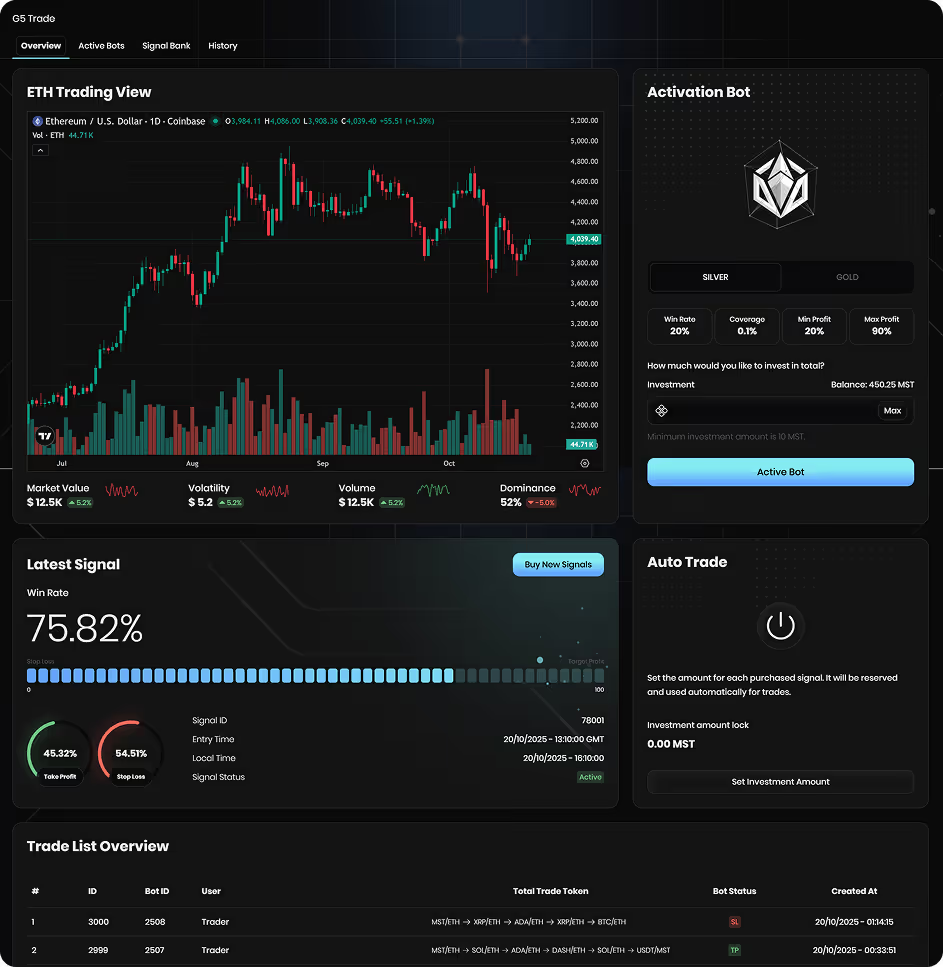
The G5 section includes four key tabs that help you manage, analyze, and optimize your trading performance:
1. Overview Tab – Where the Action Happens
This is your main trading hub for activating and monitoring the G5 bot.
🔹 Live Chart (TradingView Integration)
Displays the real-time ETH/USD or BTC/USD market chart, allowing you to observe short-term trends and identify potential trading opportunities before activating the bot.
🔹 Activation Panel
.avif)
Here, you select your preferred signal type (Silver or Gold) and enter your investment amount (minimum 10 MST).
- Silver Mode – Prioritizes safety and stability with moderate returns.
- Gold Mode – Focuses on aggressive strategies for higher profit potential, but with increased risk.
Once you’ve selected your mode and amount, click “Activate Bot” — the bot will begin trading immediately.
🔹 Auto Trade
This section allows you to lock an investment amount that will be reused automatically for every signal cycle.
Perfect for users who want the bot to trade continuously without needing to manually activate each time.
🔹 Latest Signal Metrics
Displays:
- Current Signal ID
- Win Rate and TP/SL Ratio
- Signal Status (Active or Expired)
This gives a real-time view of the market pulse and the bot’s performance accuracy.
🔹 Trade List Overview
Shows the latest trades executed by users across the G5 network — including bot IDs, token pairs, results (TP/SL), and timestamps.
This section provides transparency and helps you compare your bot’s behavior with others operating on the same signals.
2. Active Bots Tab – Track Your Live Positions
The Active Bots tab gives you a clear snapshot of all bots currently running under your account.
You’ll see:
- Total Bots and Total Investment
- Total Take Profits (TP) and Stop Losses (SL)
- Overall Win Rate
- Realized Profit (in MST) per Bot
- Initial Investment and Activation Time
Each bot card also displays the status of your latest trades, helping you monitor whether your open positions are performing as expected.
💡 Tip: Use this section to monitor your exposure and decide when to switch between Silver and Gold signals based on recent performance trends.
3. Signal Bank Tab – Your AI Signal Database
The Signal Bank is one of the most valuable features of G5.
It stores both active and expired signals and provides detailed insights into the bot’s market decisions.
🧩 Latest Signals
At the top, you’ll see the most recent signals categorized as Silver or Gold, each showing:
- Win Rate
- Target Profit
- Stop Loss
- Entry Time
- Status (Active, TP, or SL)
📊 Signal History Table
Below, a detailed record of all signals includes:
- Signal ID
- Bot Type (G5 Silver or G5 Gold)
- Provider (metaset.ai)
- Success Rate
- Target Profit / Stop Loss percentages
- Final Status (Success / Fail)
This transparency lets you analyze how signals perform over time, helping you refine when to activate your bot or which mode to trust more in certain market conditions.
4. History Tab – Track All Transactions
The History Tab provides a full record of your completed transactions, including:
- Transaction ID
- Bot Type (Silver / Gold)
- Final Balance after market cycle
- Whether the trade was lost after settlement
- Whether loss coverage was applied (“Made Risk”)
- Created and finished timestamps
This section serves as your auditable trading log, ideal for reviewing historical performance, verifying risk coverage, and tracking time-based efficiency.
How G5 Works
- The G5 AI scans the crypto market for short-term price movements every few minutes.
- Based on technical and statistical indicators, it issues Silver or Gold signals predicting the next short-term direction.
- When activated, your bot follows the live signal automatically and executes the trade.
- Results (TP or SL) are calculated at the end of the cycle and displayed in your dashboard.
All signals and results are tracked transparently, allowing users to follow patterns and make data-informed trading decisions.
💡Strategy Tips and Risk Management
- You don’t need to activate the bot on every signal — sometimes, simply observing signal accuracy for a while can help you identify better timing.
- Use the Signal Bank to study performance trends before choosing Silver or Gold.
- Diversify your trades — don’t allocate all your balance to a single mode or signal.
- Keep track of your win/loss ratio in the History tab to adjust your trading approach over time.
🔒Risk and Coverage
The G5 Bot includes loss coverage, ensuring that a small portion of your potential losses is absorbed by Metaset.
However, the market remains volatile, and both profits and losses are natural outcomes of automated trading.
Loss coverage is exclusive to G4, G5, and G6 bots — long-term bots like Risk-Free and Owner Bot do not include this protection.
⚠️Important Reminder
Trading in financial markets always involves risk — even with AI automation.
You are not required to activate the bot on every signal.
Take your time to observe, analyze patterns in the Signal Bank, and activate when you feel conditions are right.
Cautious and informed activation can make a major difference in your long-term profitability.
Conclusion
The MetaTrade G5 Bot is the ideal middle ground for traders who want to experience the excitement of AI-driven short-term trading without excessive volatility.
It combines speed, control, and transparency, offering both aggressive and balanced strategies through its Gold and Silver modes.
With built-in loss coverage and clear performance analytics, G5 empowers traders to take advantage of short-term market moves — safely and intelligently.
Whether you trade daily or periodically, G5 adapts to your rhythm — giving you data, precision, and flexibility in one advanced system.
Related FAQs
the minimum deposit amounts for each payment method:
🔹 For TRX deposits: The minimum deposit amount is $10 equivalent in TRX.
🔹 For USDT (TRC20) deposits: The minimum deposit amount is $50.
If your deposit is below these minimum limits, the funds will be considered as network fees and will not be added to your balance. This is a TRON network policy and is not controlled by Metaset.
Additionally, for every deposit, Metaset assigns a new wallet address. Ensure you always use the latest wallet address displayed on your deposit page. If you deposit funds to an old address, only the first deposit will be processed, and subsequent deposits to the same address will not be credited.
Don’t miss your chance to trade smarter, not harder
Join Metaset and take your trading decisions to the next level with data-driven confidence